Measurement

Marketing Mix Model

Measure what each channel actually contributed. Skeleton Key runs the model for you and brings back the answers in plain English, ready for your next strategy.
Request a demo or get in touch

Start Free Trial
Measurement feature graphic: a folder holding a chart of four bars, each with a range whisker through its top

What your marketing drove.
Not what got the last click.

Your data, set up for you

Start from one CSV of your spend and results.

  • Columns recognized and mapped as you upload
  • Organic activity, seasonality and macro factors accounted for, so paid media isn't over-credited
  • Geo-level modeling whenever your data is split by region
  • Built for a year or more of weekly history
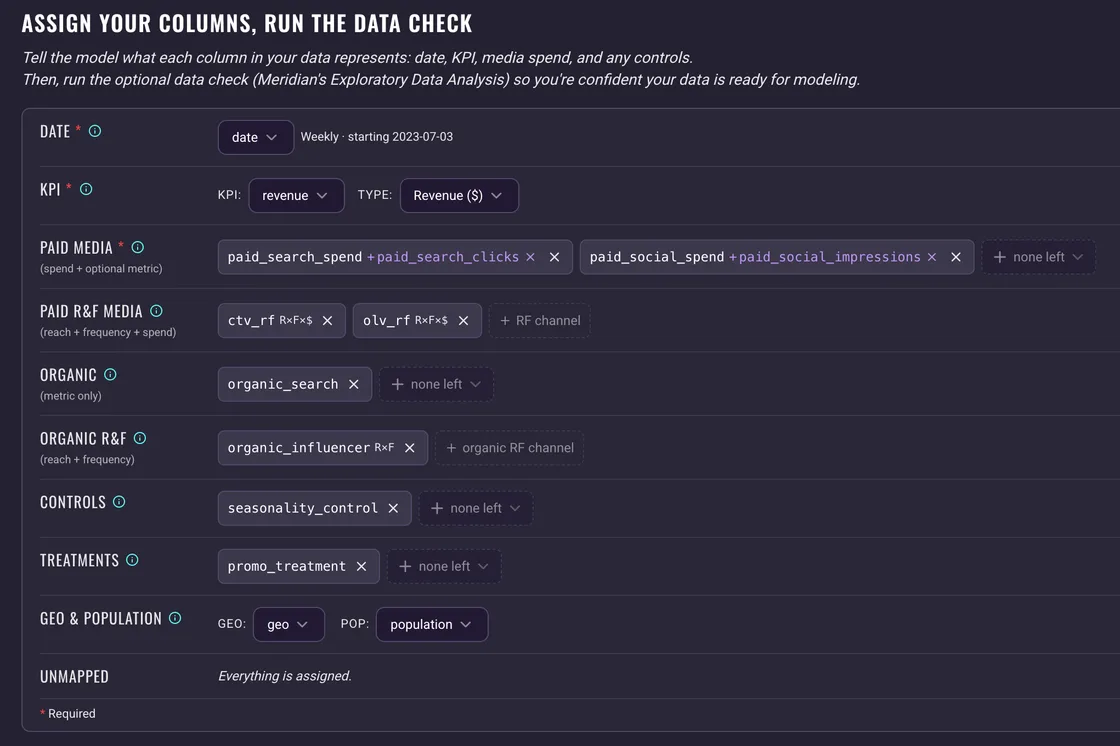
The Assign Your Columns, Run the Data Check card on the new-run page, every column of a weekly CSV assigned to a role: date, a revenue KPI, two paid channels with their execution metrics, two reach and frequency channels, organic drivers, a control, a treatment, geo and population

Ready before you run

A full exploratory data analysis (EDA) comes first.

  • A clear verdict on whether your data is ready: Good, Caveats or Issues
  • Data sufficiency, spend variation and collinearity, each charted in its own report
  • Blocks only what's guaranteed to fail, and warns on the rest
  • Re-run it as often as you need while you fix your data
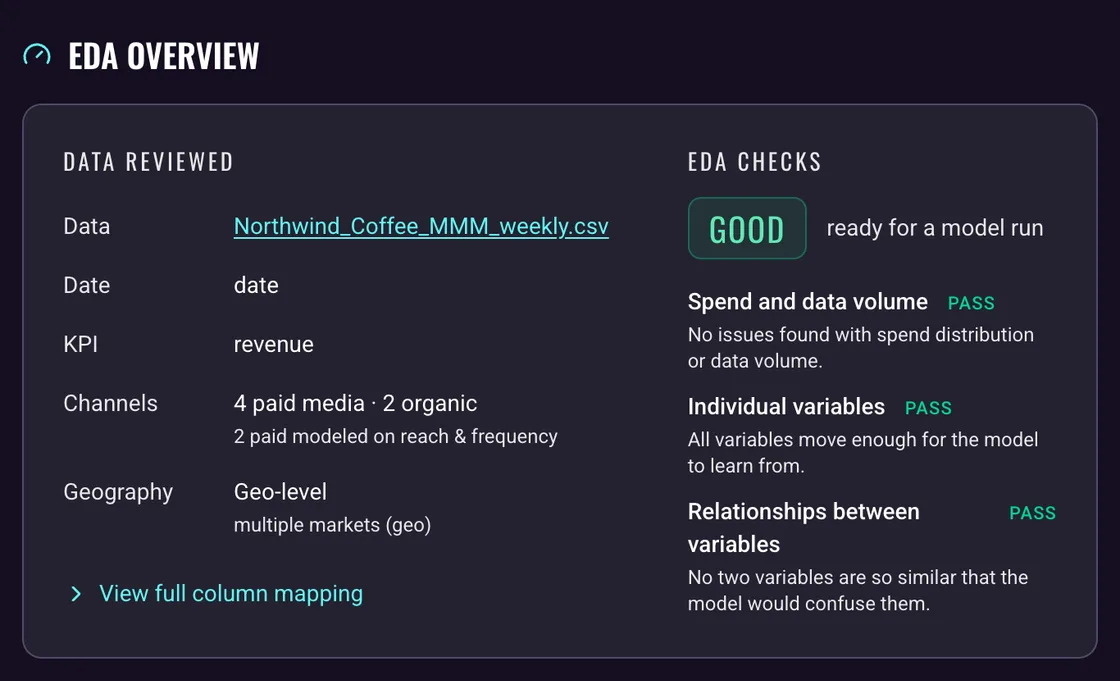
The EDA Overview card of a data-check report: the data reviewed, a weekly CSV with a revenue KPI, four paid and two organic channels at geo level, beside a Good verdict, ready for a model run, over three passed check groups

Clear answers. Honest ranges.

The model does the fitting, and every result comes with a health check and its margin of error.

  • Convergence, fit and baseline checks, each explained in plain English
  • A 90% credible interval on every return
  • Calibrate the model with your own lift-test results
  • Directional reads: which channel works harder, not the second decimal
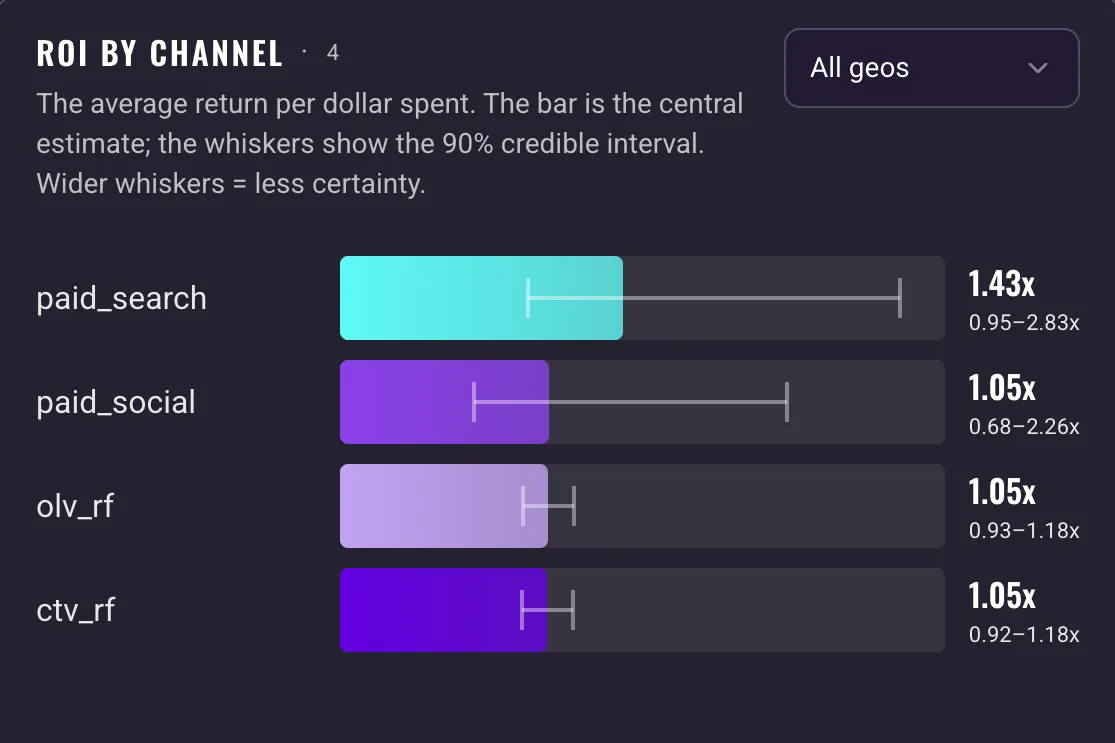
The ROI by channel chart on a results page: four paid channels as bars, each with a whisker for its 90% credible interval and its return printed as a central figure over a range, such as 1.43x over 0.95 to 2.83x

What comes back

Everything the model found, channel by channel, and region by region when your data allows.

1 of 7+ charts on the results page
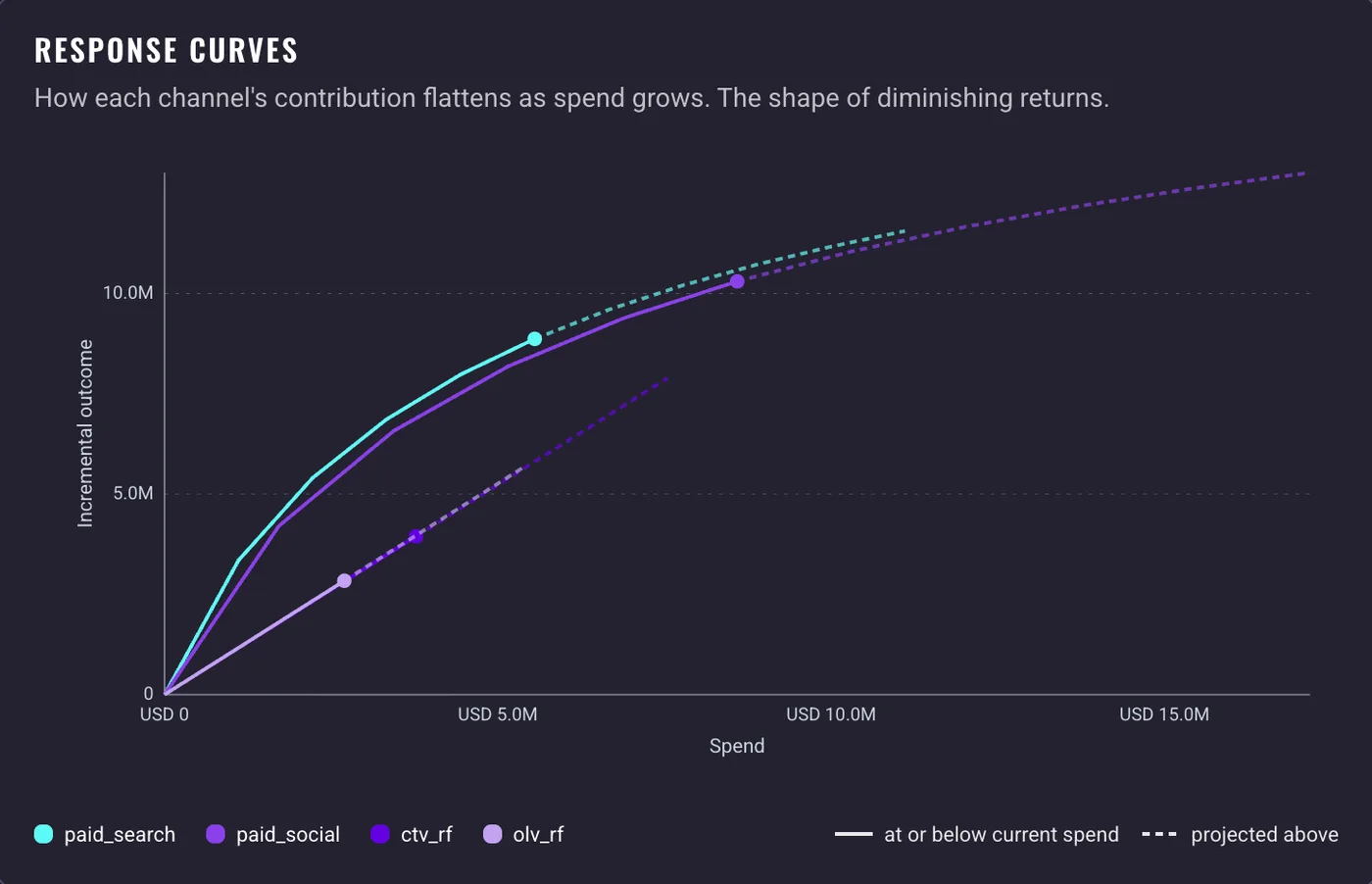
The Response curves chart on a results page: incremental outcome against spend for four paid channels, each curve marked at its current spend and dashed where it is projected beyond it

Response curves, adstock

Where more spend stops paying

The point each channel saturates, and how long its effect outlasts the spend.

Contribution

Where your results came from

What you'd have earned anyway, and the incremental share each channel added.

ROI, marginal ROI

What each channel returned

The return on every dollar, and on the next one.

Take it further

PDFMarkdownTechnical reportOpen in new tabAttach to Strategy

Your next strategy, built on what worked.

Your goals and channel mix start from what the model measured, not from benchmarks alone.

  1. 1Run the model. The results save to Documents.
  2. 2Attach the results to any Strategy run.
  3. 3The Goals and Media Strategists build on them.
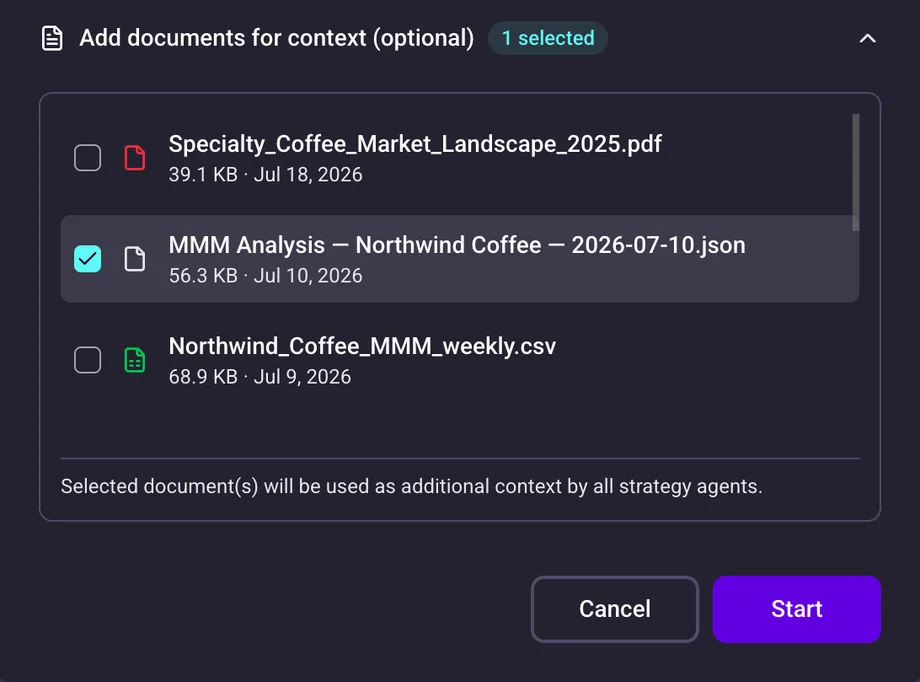
The Generate New Strategy dialog for a campaign: the documents for context list with the brand's MMM Analysis file ticked, one selected, above Cancel and Start buttons

Frequently asked Questions

What model does it run?
Meridian, Google's open-source Bayesian marketing mix model. Skeleton Key runs it for you, so there's no code to write and nothing to install. Sensible defaults cover most runs, and you can tune the priors and sampling settings as needed.
What data do I need?
One CSV with a row per week: the date, your results and what you spent on each channel. You'll need at least a year of history. Google's guidance is closer to three years, or two if your data is split by region. The app gives you column templates, and our data preparation guide walks through the format.
Does it connect to my data sources?
No. You export from your ad platforms and analytics and combine them into one file. Skeleton Key reads no analytics, CRM or ad-account data today. If direct connections matter to your team, let us know.
How is this different from attribution?
Attribution assigns credit along individual customer journeys. A mix model works from your weekly totals instead, which lets it measure channels attribution struggles with, like TV, out-of-home and online video. It also accounts for organic activity and seasonality, and separates what your marketing drove from what would have happened anyway. The two answer different questions.
How long does a run take?
The exploratory data analysis takes 5 to 7 minutes. The model takes 15 to 20 minutes, depending on the data.
How much can I trust the numbers?
Read the model's health verdict first. Good means the numbers are safe to present after a sanity check of your inputs. Caveats means read the health detail before you do. Failed means do not rely on them. Even a healthy model is directional on a short history or thin spend variation, and it works best alongside an incrementality test, not instead of one.
What if the model fails?
The results page names the check that failed and says what to change, from the run's settings to dropping a channel with very little spend. A finished model never re-runs. You start a new one with the changes.
Can it tell me where to move budget?
It informs the call rather than making it. Marginal ROI shows which channels return more on the next dollar, and the response curves show where each one flattens. The budget decision stays yours.
Who can see the results?
Anyone with access to the brand: in the app, on the read-only page that Open in New Tab gives you, or as a PDF or Markdown download. There is no public link.

Want to learn more?
Let’s chat.

Request a demo or get in touch