

Consumer Analyst
Profiles who buys in your category, what drives their choices, and when demand emerges.
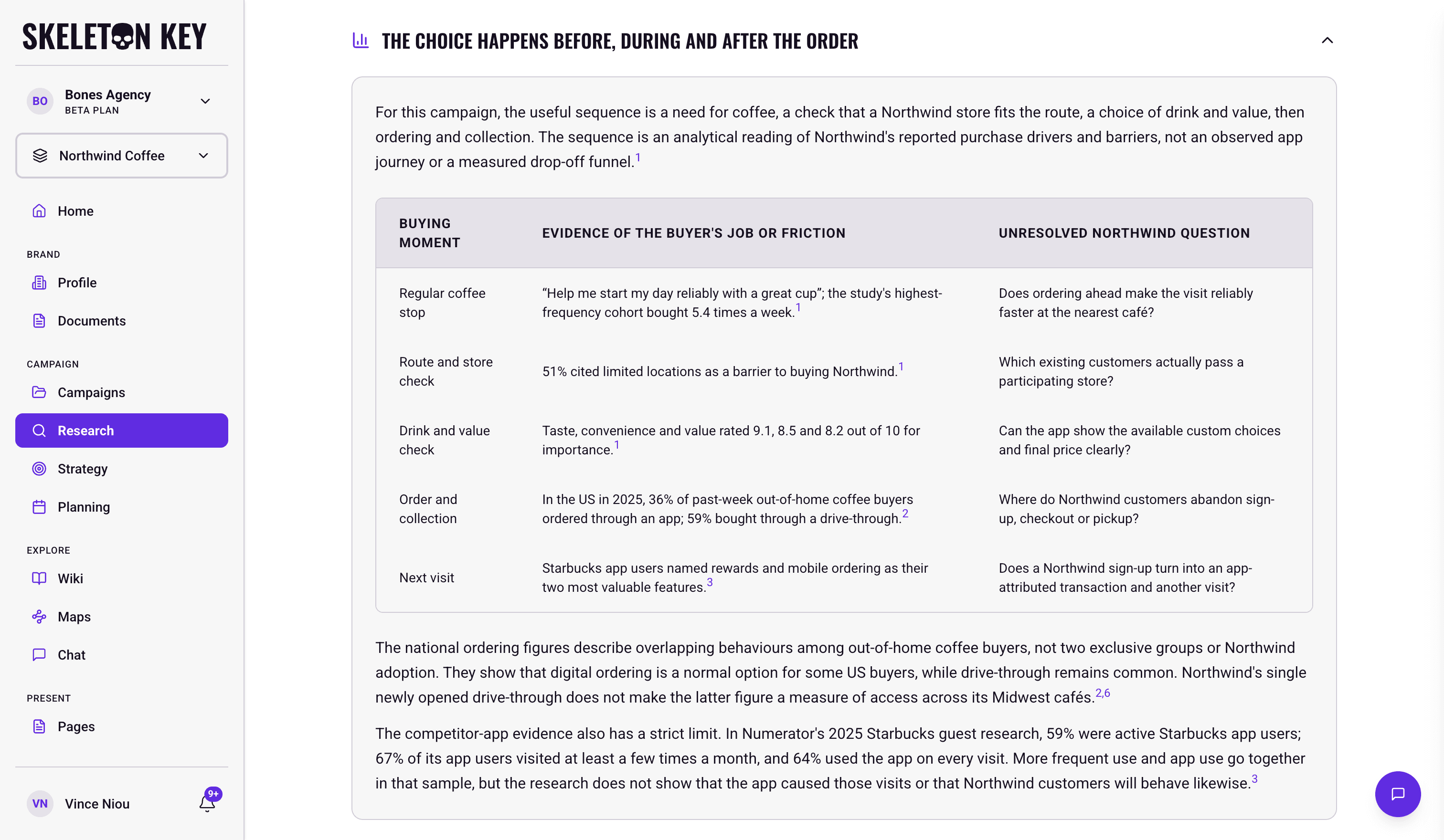
The Consumer Analyst is one of the five Research analysts. It builds the audience layer of the research dossier: who buys in your category, what drives their choices, and when demand emerges. The Audience Strategist builds personas from this evidence later, in Strategy.
What it does
The analyst draws on the category's buyer profile, buying motivations and behaviors, pain points, triggers and barriers, the moments and entry points when people start looking, decision criteria and the purchase journey, and the jobs people hire the category to do. It picks the angles most likely to change a decision for your brand and brief rather than covering every one, and names its sections after what it found. The writing carries consumers' own language, quoted from the evidence, and names each group of people as the sources name them rather than inventing segment labels. Expect one or two charts, such as a quadrant or radar of consumer traits or a timeline of the stages from trigger to purchase.
Where to find it
Inside a brand or campaign, navigate to Research. After the Research run completes, the Consumer Analyst output appears as the third of five analyst tabs on the Research page.
How it works
When you start a Research run, all five analysts run in parallel. The Consumer Analyst reads the brand profile, the campaign brief if you're running campaign-scoped Research, and any attached documents. It works from the evidence the search step gathered on the category's consumers and runs its own web searches to fill any gaps.
A Research run takes about 5-7 minutes. All five analysts run at once, so there is no separate time for each analyst.
What you can adjust
Target audience in the campaign brief: the most direct lever for shaping the analysis. A precisely named target audience points the analyst at that segment's motivations, barriers, and journey. Sharpening the brief and re-running improves the findings more than any other adjustment.
Document attachment: before starting a Research run, select documents from the Documents page (PDFs, Word files, Markdown, CSVs, Excel sheets) to attach. The analyst treats them as high-priority input. Previous audience research, segmentation studies, and customer interviews are particularly useful here.
Refine: Use the Refine button after a run to submit feedback. Refining Consumer re-runs only this analyst. The other four carry forward unchanged. Prior versions stay in history. See Refine.
Limits and considerations
- Published evidence, not your own surveys. The findings synthesize available signals from published sources. Validate them against any first-party audience research you have before treating them as ground truth. Attaching segmentation studies, customer interviews, or other first-party research from the Documents page brings that data into the analysis directly.
- English-first source bias. Web research draws primarily from English-language sources, which can underrepresent non-English-speaking audiences in the findings.
- Vague briefs produce vague findings. Without a sharp target-audience definition in the campaign brief, the findings trend generic. Tighten the brief, not the analyst.
- Beta software. Validate cited claims and audience assumptions before briefing teams or committing budgets.
Last updated: 2026-11-02