

Competitor Analyst
Profiles direct and indirect competitors on positioning, messaging, and Share of Search.
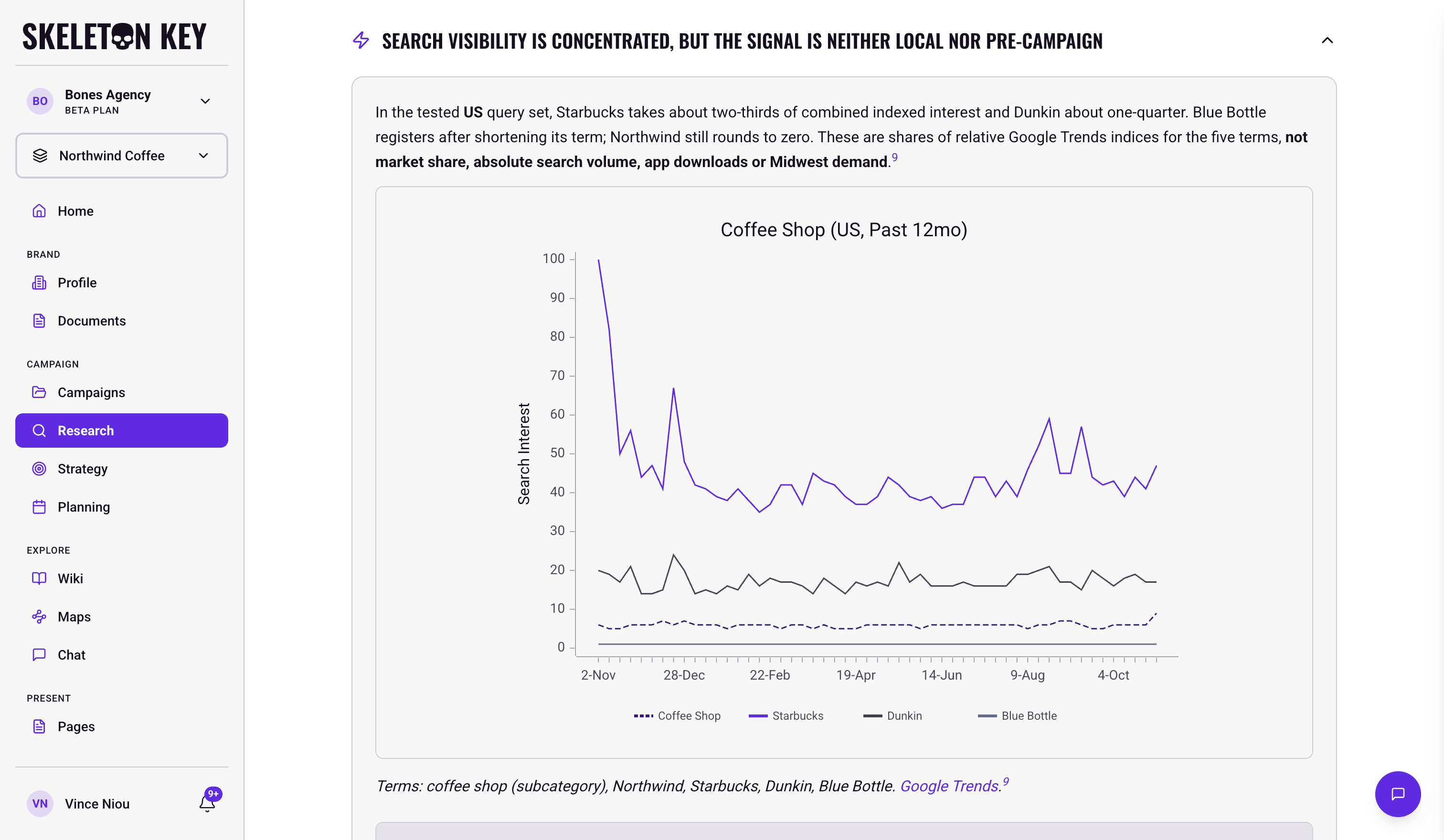
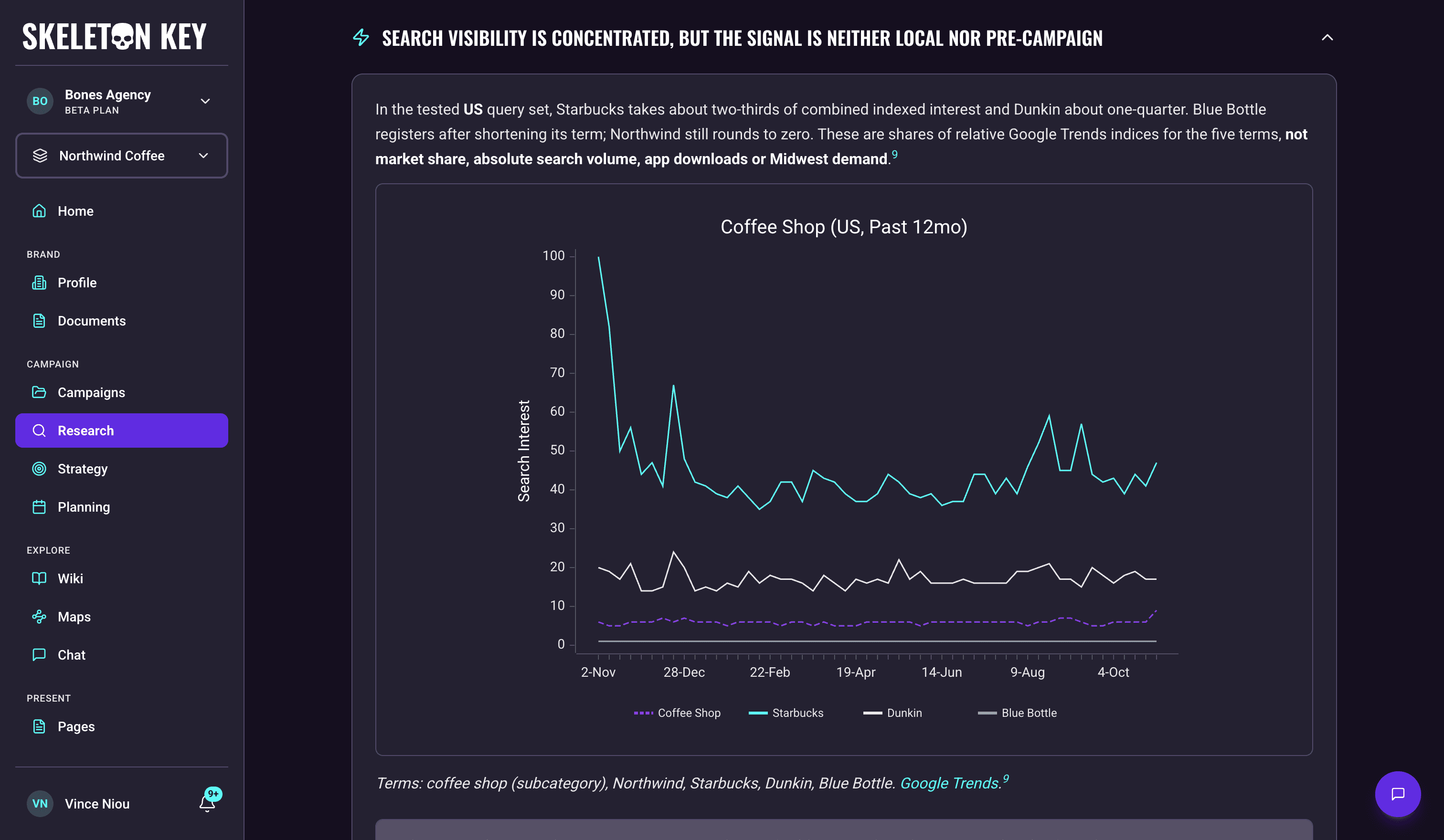
The Competitor Analyst is one of the five Research analysts. It maps the competitive set: how direct and indirect competitors position themselves, what messaging they run, and how branded search interest in each compares to yours. If you need to know where your brand sits in the competitive field before writing strategy, this is the analyst to start with.
What it does
The analyst answers one question: who are you competing against, and how are they positioned? It draws on the competitive set and the reasoning behind it, brand, product, and proposition comparisons, positioning whitespace, and the distinctiveness and messaging patterns across the set. It picks the angles most likely to change a decision for your brand and brief, names its sections after what it found, and uses the same competitors in every table. It typically adds a radar or quadrant chart comparing the competitors.
Every Competitor report carries Share of Search for each market the search data covers: one line chart per market of search interest over the past 12 months, comparing a generic subcategory term (such as "coffee shop"), your brand, and up to three of the competitors the report covers. A note under each chart names the terms and links to the same comparison on Google Trends. When the report covers two or more markets, the charts appear together as a carousel you can step through. A term with no search interest in a market is left off that chart, so a newer or smaller brand may not appear. If neither the campaign nor the brand names a market, the chart covers worldwide search and is labeled Worldwide.
Citations come from market research, news coverage, brand websites, ad libraries (where publicly indexed), Google Trends signals, and any documents you've attached.
Where to find it
Inside a brand or campaign, navigate to Research. After the Research run completes, the Competitor Analyst output appears as the second of five analyst tabs on the Research page.
How it works
When you start a Research run, all five analysts run in parallel. The Competitor Analyst reads the brand profile (particularly the competitors you've named), the campaign brief if you're running campaign-scoped Research, and any documents you've attached, and supplements them with web research on each competitor. For Share of Search, a tool picks the search terms, spelling each the way people search for it, including local-language names, then fetches Google Trends for each market in scope and computes each term's share. The chart is built from that data rather than retyped by the analyst.
A Research run takes about 5-7 minutes. All five analysts run at once, so there is no separate time for each analyst.
What you can adjust
Competitors named in the brand profile and campaign brief: the analyst grounds its report on the competitors you've listed. If a key competitor is missing from your output, add them to the brand profile or campaign brief and re-run.
Document attachment: before starting a Research run, you can select documents from the Documents page (PDFs, Word files, Markdown, CSVs, Excel sheets) to attach as context. The analyst treats them as high-priority input alongside web research, making this useful for prior competitive audits, category reports, or positioning decks you already have.
Refine: Use the Refine button after a run to submit feedback. Refining Competitor re-runs only this analyst. The other four carry forward unchanged. A refine keeps the Share of Search charts it still uses unchanged, and fetches new search data only when your feedback changes what needs measuring, such as the competitor set or the markets. Prior versions stay in history. See Refine.
Limits and considerations
- No private competitor data. Beyond your own inputs and attached documents, the analyst sees what's publicly indexed: ad libraries (where available), search signals, news coverage, brand websites. It cannot access competitors' first-party data, internal strategy documents, or paid research databases. Prior competitive audits or paid-database extracts can be attached from the Documents page to bring them into scope.
- Share of Search is a within-set comparison. The figures split search interest across the compared terms only: the generic subcategory term plus the brand names. Each chart is scaled to the highest point in its set, so a smaller brand can look tiny next to the subcategory term. The figures show rank and direction inside that set, not awareness, market share, or share-of-voice. Use them as directional context, not as a media-buying input.
- Search charts can be absent. When Google Trends returns no data for the compared terms, the report says search evidence was unavailable and chooses the competitive set from its other sources, omitting the search charts rather than building on unusable numbers.
- Indirect competitors need to be named. Direct competitors are profiled thoroughly when listed. Adjacent-category or substitute competitors are best surfaced when you name them explicitly in the brand profile or campaign brief.
- Beta software. Validate cited claims and figures before briefing teams or committing budgets.
Last updated: 2026-11-03